Tutorial 14 of 14
Export a scene as GLB with PBR materials
Intermediate 6 min
Save your Renderloom scene as one glTF 2.0 file with solids grouped by tag, finishes as metallic-roughness materials and an optional Material Nodes or Texture Lab texture.
GLB is the binary form of glTF 2.0. Blender, Godot, Unity and Unreal importers and most web 3D viewers open it directly, so it is the easiest way to take a Renderloom scene somewhere else.
Open the GLB export
Open Export in the scene workspace and choose GLB (glTF 2.0)…. The dialog exports the current scene; choose Export visible solids only to leave hidden solids out.
Every solid becomes its own node with its position, Z rotation and tilt. Solids are grouped under one node per tag, so the hierarchy in Blender's outliner matches your tags. Colors and finishes become metallic-roughness materials: matte and satin stay non-metallic with different roughness, metal is fully metallic.
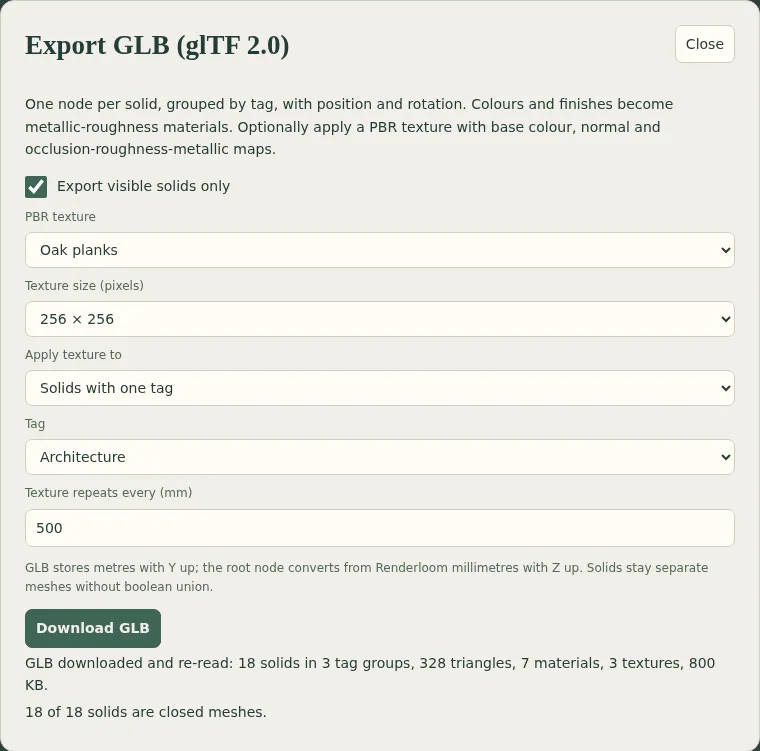
Add a PBR texture
PBR texture applies one textured material:
- a Material Nodes preset (Red brick wall, Oak planks, Cobblestones, Brushed metal or Woven fabric) at 128 or 256 pixels, or
- one of your saved Texture Lab materials. Its normal map is converted to the glTF +Y convention if you exported it with a flipped green channel.
The GLB contains three PNG images: base color, normal map and one occlusion-roughness-metallic image. Apply texture to chooses all solids, solids with one tag or the selected solid. Texture repeats every (mm) sets the tile size: top and bottom faces are mapped from above, side faces along their outline.
Check the result
After Download GLB, Renderloom reads the file back with a strict glTF parser and reports solids, tag groups, triangles, materials, textures and file size, and whether every solid is a closed mesh. GLB stores metres with Y up; the root node converts from Renderloom's millimetres with Z up, so the scene arrives upright and at true size.
Solids stay separate meshes with flat shading: there is no boolean union, and cameras, lights and render settings are not exported. Texture images are stored uncompressed, so 256-pixel textures add about 800 KB.
Tools for scripts and agents
Renderloom Scene to GLB creates the same file from a scene, Form Studio project or render recipe with a Material Nodes texture through the tool page, the JSON API and MCP. GLB Inspector checks any GLB file: chunks, buffers, accessors, node hierarchy, materials, textures and whether each mesh node is watertight.
Ready to try it?